Build an Expert Advisor
Automate your strategy right inside Pip Trader, our desktop terminal. Expert Advisors are written in JavaScript with an interface intentionally modeled on MetaTrader 5’s MQL5 — if you’ve built EAs before, this will feel familiar.
Get the terminal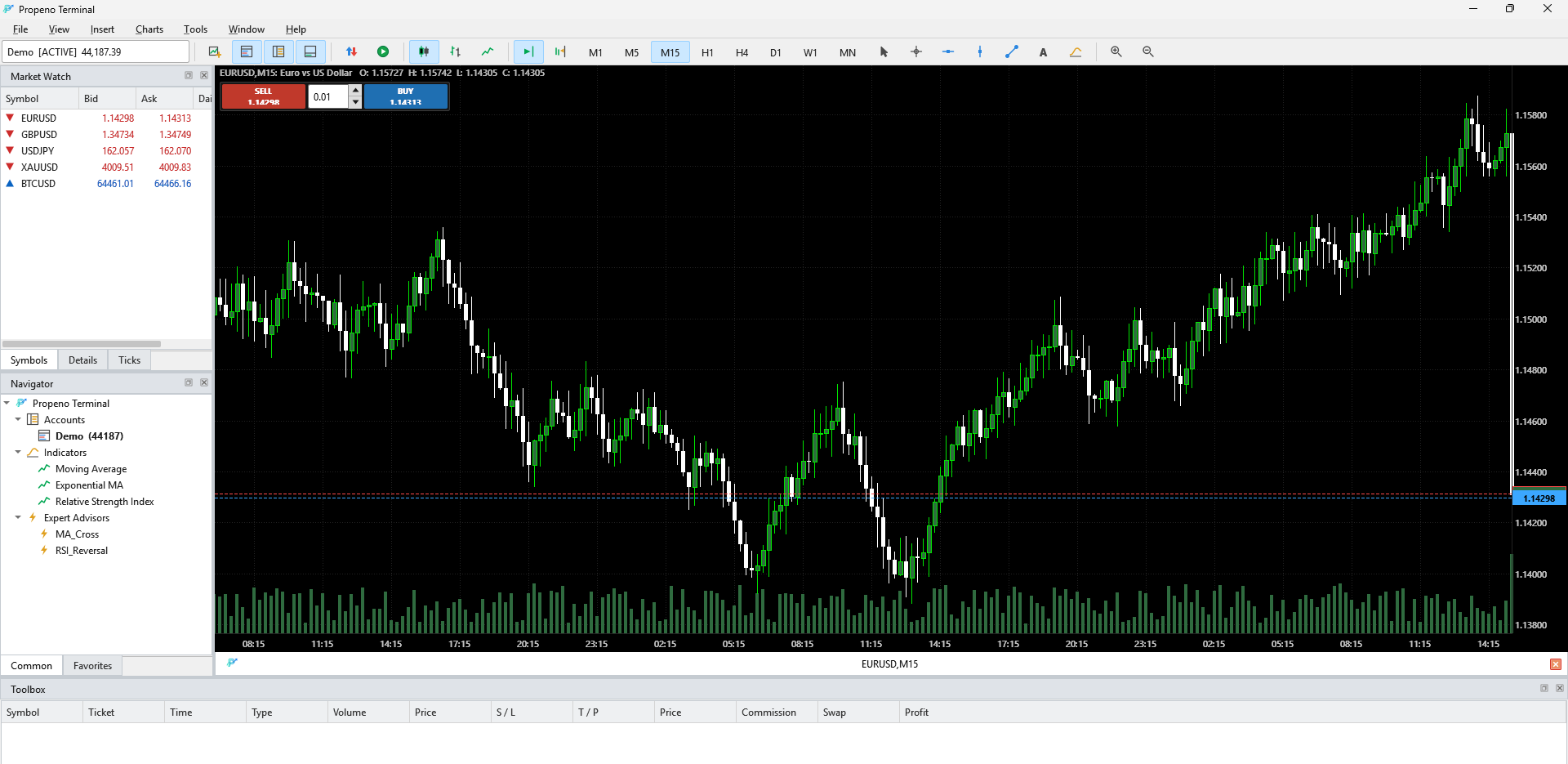
Compiled MT5 EAs (.ex5) can’t run here. They are proprietary MetaTrader bytecode. Re-express your strategy’s logic as a Propeno .js Expert Advisor using the API below.
Where your Expert Advisors live
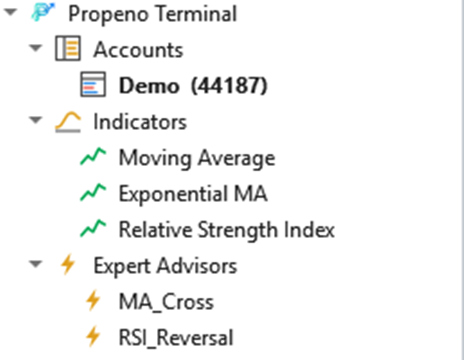
Every .js file in your Experts folder shows up under Navigator → Expert Advisors. Two examples, MA_Cross and RSI_Reversal, are installed for you. Open Tools → Open Experts Folder to add your own, then double-click it to attach it to the active chart.
The lifecycle
Your EA defines the handlers it needs. Any it omits is simply skipped.
OnInit()Once, when the EA is attached. Return true to proceed.
OnTick()On every price tick of the chart’s symbol — most logic lives here.
OnTimer()On a timer you start with EventSetTimer(seconds).
OnDeinit()Once, when the EA is detached or the chart closes.
Write your first Expert Advisor
A complete EA in a few lines: it opens a long when the fast EMA crosses above the slow EMA and flattens on the reverse cross.
// MA_Cross.js — buy when the fast EMA crosses above the slow EMA,
// close when it crosses back below.
var Fast = 10, Slow = 30, Lots = 0.10;

function OnInit() {
  Print("Started on " + Symbol());
  return true;
}

function OnTick() {
  if (Bars() < Slow + 2) return;

  var f1 = iMA(Fast, MODE_EMA, 1), s1 = iMA(Slow, MODE_EMA, 1);
  var f2 = iMA(Fast, MODE_EMA, 2), s2 = iMA(Slow, MODE_EMA, 2);

  // fast crossed up through slow → open one long
  if (f2 <= s2 && f1 > s1 && Positions.count() === 0) {
    Trade.buy(Lots, { slPoints: 300, tpPoints: 600 });
  }
  // fast crossed back down → flatten
  else if (f2 >= s2 && f1 < s1 && Positions.count() > 0) {
    Trade.closeAll();
  }
}API at a glance
Market data
Bid, AskCurrent best bid / ask price.Symbol(), Digits(), Point()Chart symbol, its decimals, and smallest price step.Close(shift), Open(shift), High(shift), Low(shift)Candle values — shift 0 = forming bar, 1 = last closed.Bars()Number of candles loaded.Indicators
iMA(period, method, shift)Moving average — method MODE_SMA (0) or MODE_EMA (1).iRSI(period, shift)Wilder’s RSI (0–100).Trading
Trade.buy(lots, opts)Open a market BUY. opts = {sl,tp} prices or {slPoints,tpPoints}.Trade.sell(lots, opts)Open a market SELL.Trade.closeAll()Close all positions on this symbol.Positions.count()Open positions on this symbol.Account & utility
Account.balance, Account.equityBalance, and balance + floating profit.Print(...), Comment(text), Alert(text)Log to the Experts tab / chart corner.EventSetTimer(sec), EventKillTimer()Start / stop the OnTimer() timer.Attach it & go live
- 1
Open Tools → Open Experts Folder and drop your .js file there (two examples are already installed).
- 2
Open a chart, then double-click your EA under Navigator → Expert Advisors to attach it. Its name shows in the chart’s top-right corner.
- 3
Turn on the green Algo Trading button in the toolbar so the EA can place orders. With it off, the EA still runs and logs, but trades are blocked.
- 4
Watch Toolbox → Experts for your EA’s Print() output and executed orders.

The green Algo Trading button must be on for an EA to place orders.
Coming from MQL5?
OnTick()OnTick() — sameOrderSend(… ORDER_TYPE_BUY …)Trade.buy(lots, {sl, tp})PositionsTotal() (this symbol)Positions.count()iMA(_Symbol,_Period,p,0,MODE_EMA,…)iMA(p, MODE_EMA, shift)iRSI(_Symbol,_Period,p,…)iRSI(p, shift)SymbolInfoDouble(_Symbol,SYMBOL_BID)BidAccountInfoDouble(ACCOUNT_EQUITY)Account.equityGood to know
- EAs are sandboxed: no file, network or UI access — only this API.
- One EA per chart. Attach to another chart to run more.
- Orders follow the same server, risk and slippage rules as manual trading.
- Pending orders, partial closes and multi-symbol EAs aren’t in this version yet.
Ready to automate?
Download Pip Trader, open Help → Expert Advisors Guide for the full API reference, and attach your first EA in minutes.